

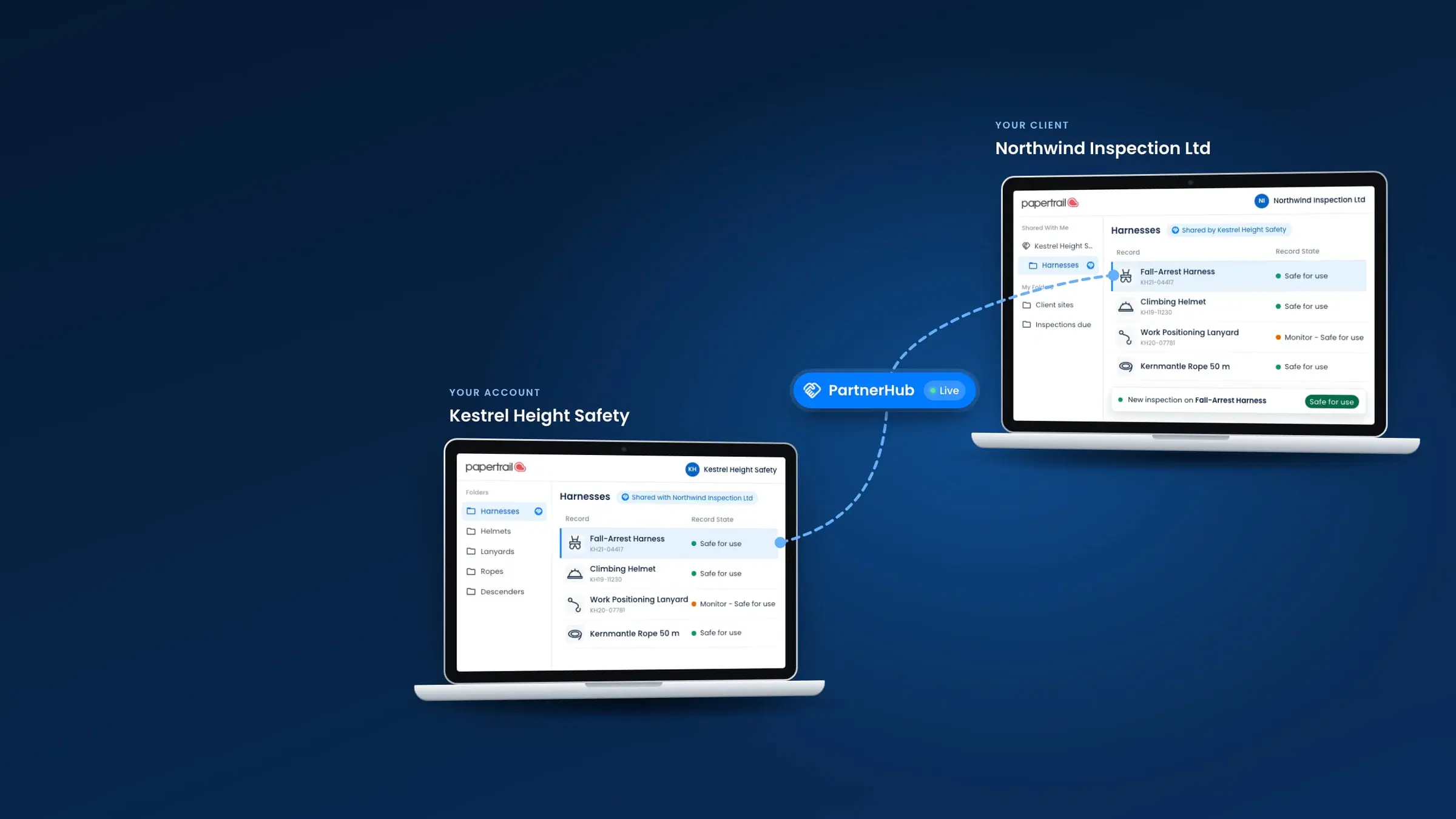
PARTNERHUB
The client portal for inspection records
Share live inspection records, certificates and equipment histories with clients, suppliers or inspection bodies outside your Papertrail account. No PDFs to re-export, no re-typing when something changes.
No credit card required.


Connect once. Share what you choose. Stay in sync automatically.
PartnerHub connects your account to the organisations you work with, so they see the records you share, and every update to them, in their own workspace.
Connect
Invite any partner outside your account. One invitation, one acceptance: no repeat setup the next time you share something with them.
Share
Choose the records to share: one item, a whole kit bag, or every asset on a contract. Multiple records at once, not one at a time.
Stay in sync
Every new activity, inspection, certificate and note upload on a shared record is visible to your partner the moment you add it. Nothing to re-send, nothing to re-export.
PartnerHub - Advanced data sharing
Share equipment records with anyone you choose
Whether you manufacture the equipment, supply it or inspect it, share single records, whole folders or complete folder structures with your customers, auditors and contractors. Every serial number, certificate and inspection goes with them into their own Papertrail account, where they file them their way. Ownership stays with you. Your partners are notified the moment you share, and new inspections reach them instantly.
Northgate, the supplier, selects the five new items in its Harbour Wind order folder.
What changes once you're connected
| Without PartnerHub | With PartnerHub | |
|---|---|---|
| Records | Re-typed by hand from a PDF or a paper certificate, on both sides of the relationship | Arrive already in your account, nothing to re-enter |
| Staying compliant | You chase your partner for the latest certificate, or they chase you | Whoever holds the record keeps it current; the other side sees it as it changes |
| What you're left with | The equipment, or the completed job, on its own | The equipment or job, plus a live digital record and full audit trail |
| The relationship | Ends at delivery or sign-off | An ongoing digital connection with that partner |
Whichever side you're on
If you're the onebeing inspected
Invite your inspection contractor, your supplier, or another site into a PartnerHub partnership. You see the record in your own workspace the moment they update it: the activity, the certificate, who signed it off. Not a PDF forwarded after the fact.
If you're the onedoing the inspecting
Stop being your clients' filing cabinet. Share the records you hold directly into their account, so they stop asking you for copies and start checking the live record instead.
Revoking access
If you own the record, you can stop sharing it at any time without ending the partnership. Your partner keeps a read-only copy of the record as it stood, for their own files, and it receives no further updates.
Equipment that changes hands keeps its inspection history
360 Rope has used PartnerHub to help youth climbing organisations take on second-hand equipment that larger clients no longer need.
The inspection history moves into the youth centre's own account with the equipment data, so the centre starts with the full history of the equipment, a record it can show an auditor.
- ISO 27001, British Assessment Bureau (opens cvs.babcert.com)
- LEEA Associate Member
- IRATA International Associate Member
- GetApp Category Leaders 2025, GetApp User Reviews 4.7
- Capterra Shortlist 2025, Capterra 4.7 (opens www.capterra.co.uk)
- Software Advice Front Runners 2025, Software Advice 4.7






Common questions
Does a partner need a paid Papertrail account to see shared records?
They need a Papertrail account, but not a paid one. A free account is provisioned automatically the first time you invite them, so there's nothing for your partner to set up or pay for before they can see what you've shared.
What exactly can a partner see?
Only what you choose to share, record by record: the activities, inspections, certificates, tasks and note uploads on that specific record. Nothing else in your account is visible to them.
Can I stop sharing a record?
Yes. When you unshare a record, your partner keeps an archived copy of it as it stood at that moment, and loses visibility of anything you add afterwards. Your own record is unaffected either way.
How is this different from sending PDFs or a shared drive?
A PDF or a shared-drive folder is a snapshot someone has to remember to update and resend. A shared PartnerHub record is the record itself: what your partner sees today is what's actually true today, without you doing anything to keep it that way.
Does sharing an inspector's or technician's name on a record raise a GDPR issue?
Sharing through PartnerHub's permissioned access is more secure than emailing a name and a certificate as an attachment: only the partners you choose see the record, and you can stop sharing at any time. Some regulations require the name anyway: LOLER Schedule 1 requires a thorough examination report to state who made it. Your organisation's own lawful basis for sharing personal data is for your data protection lead to confirm.
Stop exporting. Start sharing.
See how PartnerHub looks with your own records and your own partners.
26 million inspections recorded· No obligation.
Last reviewed on . MJB.